Showing posts with label frugal friday. Show all posts

Friday, February 21, 2014

Frugal Friday: Making Money With Your Phone

One great way to earn some extra cash is to use your phone. Its super easy and kind of fun! Its really just that simple. Today I'm going to go over some great apps that can put some money back in your pocket.

frugal friday make money with your cell phone mobile

The following apps I have personally used and have had great experiences with.

1) Shopkick: This is a pretty fun app, and its all based on a point system called 'kicks'. The three ways to earn kicks are by walking into select stores, scanning items in select stores, and purchases at certain stores after linking your credit card with them. There are a lot of participating stores like Target, Best Buy, American Eagle, and Old Navy.

Walk-ins are pretty self explanatory, and scanning is a lot fun. When I had Little Girl and would want to just get out of the house and walk around, I'd hit up Target just to go around and scan items. If you have kids {and trust them with your phone}, you can always let them go like a scavenger hunt. It will give you kicks and get them out of your hair while you do some shopping.

Once you've collected enough kicks, you can redeem them for different options. They have gift cards and actual items up for grabs. The gift cards range from Target, Old Navy, even Coach, and you can get things like a Vespa, a Kitchenaid mixer, and an iPad Air. The exchange rate seems to be about 250 kicks per dollar, but that can vary per reward. You'd be surprised at how fast the kicks can accrue once you get started. Especially if you link your card and make purchases at the stores that payout kicks per dollar.

You can link your credit card with the app, so when you make purchases you can earn kicks per dollar spent. For example, if you use your linked card at Old Navy and spend $50, you will receive 500 kicks. If you use your linked card at Office Depot or the Disney Store, you earn 1 kick per $1 spent, but when you hit a certain threshold you get bonus kicks too.

I've been using this app for two years now and I've earned a handful of gift cards through them. Most of them you use through the phone, but I believe some you send away for the actual physical card. I know that the Target and Lowes gift cards bring up barcodes on your phone for the cashier to scan.

2) Receipt Hog: This is the first of a few apps that require scanning receipts. They also use a point system called 'coins'. I started using this app at the end of November last year and haven't had a chance to redeem my coins yet, but I've been enjoying it so far and its really simple to use. You scan your receipt from a grocery store, drug store, box store, or club store, and you earn coins depending on how much you actually spend. It doesn't matter what you buy, but they give 5 coins if your shopping trip is under $5, 10 coins for a shopping trip between $10 and $50, $50 to $100 gives 15 coins, and $100+ gives 20 coins.

Right now the payouts are for PayPal and Amazon gift cards only. It seems like the more you save up, the better payout. For example, 1000 coins gives $5, but 1800 will give you $10. I'm very close to my first $10 payout, but since my receipts are usually after couponing trips, my coin accrual is very, very slow.

They do also have a fun little slot game that you can do to earn bonus coins. If you scan a receipt at least once a week for the first 4 weeks, you will earn coins and 1 spin on the slot machine for every receipt after that.

3) Ibotta: This app gives you money back, but its based on what you buy. They have specific items {sometimes with bonuses} that you can select and after you scan the barcode of the item for verification and scan your receipt, you will get money back. Lately they've been giving offers on generic items like $.50 back when you purchase one gallon of whole milk, any brand. But most of the time its for a specific item and size. I personally prefer it when its for a generic items. A lot of the items they have offers for, we don't normally buy.

I've received one payout through PayPal with them and it was very quick and easy. They've just recently started allowing redemptions through other means, but it seems like they might be adding more gift card options in the next couple of months. I'm hoping that Amazon will be one of them.

4) Checkout 51: This is a brand new app that started only about a month or so ago. While I've personally had a few problems with the actual app, I've had nothing but good experiences with the customer service. This app works similarly to Ibotta, where you submit your receipt with a specific item purchased on it. Apparently the app doesn't like Android phones. It doesn't want to show the week's offers. However, their website allows for you to submit the receipt by uploading a photo. Its great for me since I still can't see the offer list on my phone. As I said, its still quite new, but I think they'll do well.

Each week they change up the list of eligible items that you can get cash back on. Its been great because with each week, they've included at least one generic item like bread, broccoli, milk, etc. Unlike Ibotta, they don't require a barcode scan for verification. At least not yet.

Since its still new, I haven't reached the redemption threshold yet. They require you to have a minimum of $20 saved up in cash back in order to get your money, and right now they only pay-out option is for them to send you a check. I won't be surprised if they change it to being similar to the other apps and allow for a gift card or PayPal cash-out option.

5) Nielsen Mobile Rewards: And now for something completely different. This app runs in the background of your phone to collect anonymous data for research purposes. Every couple of weeks, as long as the program is still running on your phone, you'll receive points that can be redeemed for gift cards and many, many other options. Nielsen is a trusted company and I've been using this app for over a year now. I've made over $60 in CVS gift cards. You don't do anything, and you get money! It honestly is just that simple.

I know there are a few other apps out there that you can use to earn money back with, but I haven't used them personally.

Anyone have any thoughts on the ones I've listed? Any other apps you'd like to share?

DISCLAIMER: This post includes my referral links. I will earn rewards if you sign up through them. It would be wonderful if you chose to do so, but you are more than welcome to avoid the links. This post is to provide information for you to save money. I am not being paid, sponsored, or endorsed to provide this information. All the opinions are mine.

Shopping cart image courtesy of stockimages / FreeDigitalPhotos.net

This post is linked up to A Bowl Full of Lemons’ One Project at a Time, Weekend Wind Down Link Party, Creativity Unleashed, Work It Wednesday, Shabby Nest's Frugal Friday, live laugh linky, Lamberts Lately's Create It Thursday, & Tickled Pink.


Friday, February 14, 2014

Frugal Friday: Where do I find coupons?

This week's Frugal Friday is about obtaining the coupons that you can use. There are a lot of different places you can get them, and it can be a little overwhelming at first. Here's my list of true and legal locations you can get what you need to save money.

You need to beware though. There are a lot of illegal sites and places that have fraudulent 'coupons', so only go to trusted sources. Coupon fraud is no joke! Even when its accidental.

where to get coupons

1) Newspapers. This may be a 'duh' to some people, but you'd be surprised how many people toss out those inserts. They're literally throwing money in the trash. Now, the big question is how many to get. Yes. How many? My answer: even numbers. How many you actually get is up to you, but always get them in even numbers. Minimum of 2. The reason is, in places like Florida where a sale of Buy 1, Get 1 free {BOGO} is a true one {meaning you when you buy 1 at full price, the second one is completely free}, you can still use a coupon on that free item.

So, say an item is normally $2, but this week its BOGO. That's already a great deal since you're buying 2 and only paying the $2. Now let's add in coupons. In the recent paper there was a $1 off of 1 of that item. You go to the grocery store, buy the 2 that are BOGO, use your $1 coupon and you only pay $1 for both items. Great, right? You've lowered your cost on that item down to $.50 each instead of $2! To make this even better, let's say you bought 2 newspapers that week, so you now have two of those $1 off of 1 of that item coupon. You take both of those coupons in with you, buy the two items, use the coupons, and you literally pay nothing {except maybe tax} on those items! FREE!

It won't always work out to the above scenario, but it should give you an idea on why I really, really believe that newspapers must be bought in even amounts. It will benefit you in the end.

2) Coupon Sites. There are numerous places that allow you to print coupons. The most common sites out there are Coupons.com, RedPlum, SmartSource, & Hopster. Hopster is a new site that I haven't really had the chance to use, so I'm excited to get to know that site a little better as it grows.

The best way to determine where you should be checking for the coupons that you need is to check online coupon databases. Yes, those do exist. My favorite 'go-to' is on Southern Savers. Also, check out that site to find a store's weekly ad. She does a great job at matching up current coupons for the items that are on sale. That way you're saving both time AND money.

3) Store Sites. Yup, the stores websites. Whether grocery or other retail, check out the sites for coupons! My favorite is Target because not only do they have coupons for items like bedding and make-up, they also have coupons for other groceries. Also, check with your grocery stores to see if they take competitor coupons. My Publix accepts Target coupons, so I can print from the Target website and use them at Publix. Extra money in my pocket!

And while you're on their site, sign up for their newsletters, email and snail mail. You might be pleasantly surprised at what you'll receive!

4) Digital Coupons. I'm not really familiar with how a lot of the stores deal with digital coupons, since our Publix only recently started this program, I can't really tell you exactly how to use them. I'd check with your local retailer's website to see if they have a program and what it all entails. It usually is associated with a rewards/loyalty card or a phone number.

5) Stores. Yup! Its just as simple as that! Wandering down the aisles at the stores can score you some really good savings! Keep an eye out for little blinking machines on the shelves that spit out coupons {called Blinkie Machines, go figure}, pads of coupons up for the taking stuck on displays or even on the products themselves, and even coupon booklets. Some stores have unique booklets that are up at the front door or scattered throughout the store. Also, when you checkout, the register sometimes spits out coupons. They're everywhere in stores to keep you coming back.

Walgreens is a great example because there you can find all of the different types of coupons available from stores. When you walk in right next to their ad is their monthly store coupon book. Inside are coupons that are put out by Walgreens and can only be used at Walgreens. Even their ad will have coupons in it! When you go up and down the aisles there, you can find Blinkie Machines and tear pads. Their healthcare and pharmacy aisles have booklets with a mix of store coupons and manufacturer coupons {manufacturer coupons can be used anywhere that accepts coupons}, and when you check out, the register will usually give you a coupon for your next visit. Sometimes they're store coupons, sometimes they're manufacturer coupons. You just have to check what you get and not throw them directly into the trash. Which is very easy to do if you're not familiar with it.

Now, for a few small rules.

You can usually print two coupons per computer. Its not per printer, its per computer. I think even some tablets/phones can print coupons, which is great! If you have 5 different computers, then you can print up to 10 of one coupon! This goes hand-in-hand with my rules about getting even numbers of newspapers. Two is the magical number.

That being said, its only two. Your computer information is actually stored on the code on the coupon, so when the coupons are redeemed, the company can track it down to where it was printed {as in, your home}. Which means, under no circumstances do you copy that coupon and use it. That's considered coupon fraud. That will put you in jail and you will pay fines. You'll also not be allowed to print coupons from your computer again. But the biggest thing is: JAIL. You don't want to go to jail because you wanted to save $.50 on a pack of hot dogs, do you? Didn't think so.

That rule about copying also goes for the newspaper inserts. Do. Not. Copy. I don't think I can stress that enough with anything. Stores won't get reimbursed, which is very Not Good.

You'd be surprised how many coupons you will end up with as long as you look around. Just remember that no matter what you save, you are still saving. Every little bit helps in the long run.

If you have any advice, requests, or questions, leave a comment below!

Newspaper image courtesy of Naypong / FreeDigitalPhotos.net

This post is linked up to A Bowl Full of Lemons’ One Project at a Time & Tickled Pink.

Friday, February 07, 2014

Frugal Friday: Getting Started

Welcome to Frugal Friday! Here's where I'd plan to share tips about couponing and saving money on everyday life. Today I'm going to explain how to get started on saving money. Nothing too complicated, I promise!


Here's a brief inside on how I got started with couponing.

After I found out I was pregnant with our first daughter, we both came to the conclusion I would stay home with her instead of working. Money was going to be tight, but nothing we couldn't handle. I did know that meant that gaming would have to be put on hold for a while. Boo. However, one day when I had a bit of downtime at my temp job, I was reading news articles online. There was an instance where a lady had been arrested for stealing newspaper inserts claiming that she didn't know that it was considered stealing. I thought that she was completely nuts {she was, not going to lie - stealing is stealing}, but the article mentioned this show called Extreme Couponing was to blame for this crazy behavior. Since I had nothing better to do at home, I found the show and started watching it. It was INSANE! These people were clearly crazy and the show was obviously staged. However, it got me thinking about how there had to be a way to save money on things we were going to need, like diapers and formula.

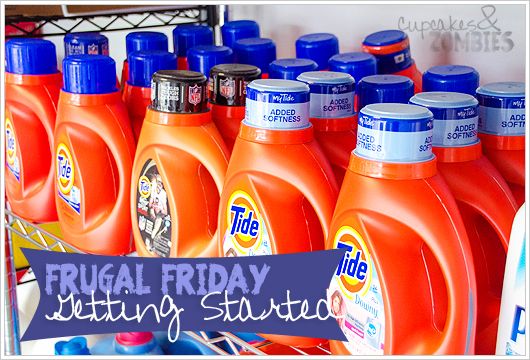
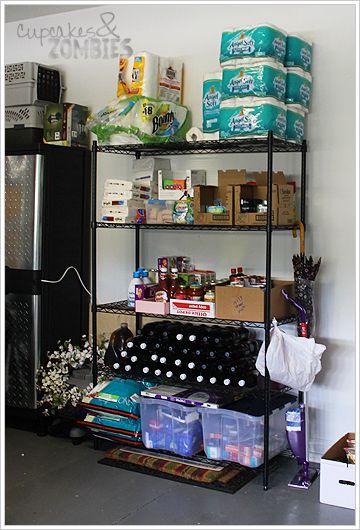
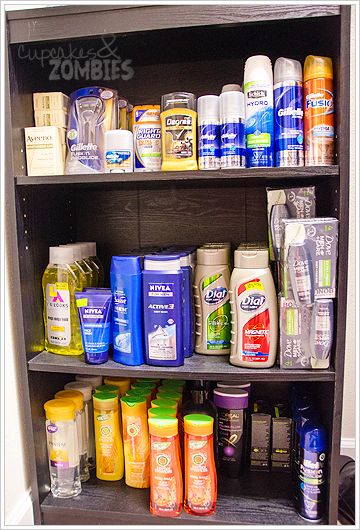
And this is where the part of my personality that becomes addicted to something easily comes into play. I dove into researching ways I could save money and pretty soon I became consumed with couponing. It was really embarrassing at first, but once I got the swing of it, I'm more embarrassed watching people spend $200 on what I can get for at least half that. I started with just two cans of shaving cream, and I was hooked. Then we bought one shelf for the garage.


That picture was taken almost exactly 2 years ago. I was extremely proud of this! We had stuff we needed and I had cut our grocery bill down considerably!

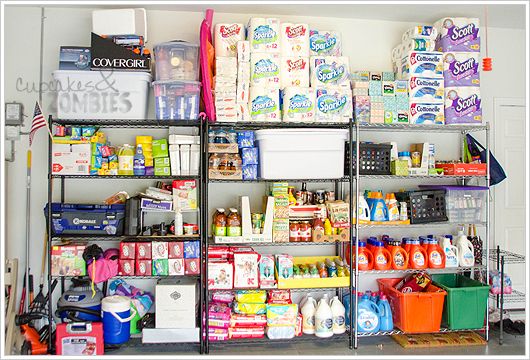
And now...


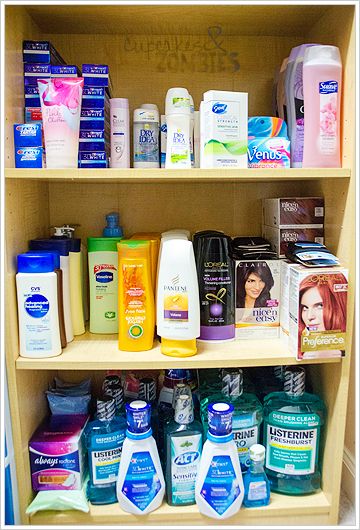
And this isn't even all of it.

We still don't have the luxury of spending a lot of money on unnecessary things, but this has helped a lot over the past two years. I've even been able to get a few new games! Keeping me sane is quite necessary.

Now, here is my advice to you.

1) Shop sales and stock up when the price is lowest. Even just Buy 1, Get 1 free {BOGO} sales will bring your cost down. However, don't simply buy an item that's on sale or BOGO just because it is. My father has a bad habit of buying mayo when its BOGO even when he has 8 in the pantry. Know your limits and what you and your family actually need.

2) Research. To find out the lowest price point may take some trial and error, but you'll start to understand it. There are great places to see what the lowest price-point is for other people, like Southern Savers, but remember that location will make that differ for each person. For instance: my lowest price-point for Dawn dish soap is $.50 for a bottle. That is because I know the lowest price it'll go down for a sale will be between $.88 and $.99 and I have rarely seen coupons with any value higher than $.50 off of 1 bottle. Since I live in Florida and absolutely none of the stores around me will double coupons {a store will match a certain amount of the coupon, but more on that topic another week}, I will only be able to get $.50 off each bottle. In a location where stores do double coupons, that $1 bottle of Dawn with that $.50 coupon will be absolutely free.

3) Pair the sales with coupons available. Check out sites like Southern Savers and Krazy Coupon Lady for coupon match-ups and a database to search to see if there are coupons available for the items you plan on buying.

4) Have patience. Start with only one store to begin with. You won't be able to get $1000 worth of groceries and for pennies overnight. You also cannot expect to have savings without putting in the time and research. You don't have to spend 60 hours a week to find good deals, but you can't expect them to just appear and be done for you.

5) Your goal should not be free, but saving at least 50% of what you're buying. At least at first. As you learn the ways, it will get easier and you'll start to notice patterns in the cycles of sales and coupons. Cutting your grocery bill in half is the ultimate goal at first. You don't want to get frustrated and overwhelmed before you even get the hang of things. Once you've got that down, you'll notice that your savings are getting bigger and your out of pocket expenses are getting lower.

Every Friday I'm going to try and break things down for you. I'd like to share a few of my favorite deals for the upcoming/current week, and share my trips in order to explain how and why I did what I did.

If you have any advice, requests, or questions, leave a comment below!

This post is linked up to A Bowl Full of Lemons’ One Project at a Time, & The SITS Girls Saturday Sharefest.